How to Choose the Best ERP for Your Small Business
Workday research has found that while business leaders know sticking with legacy systems can put them behind, the deployment process for a new ERP can be overwhelming, and often serves as the barrier to quicker adoption. With these key steps, you can identify the right ERP features for your small or midsize company and deploy it with organization and confidence.
Step 1: Decide on Your Deployment Model
First, determine whether cloud, on‑premise, or a hybrid ERP best suits your needs. Cloud ERP offers rapid deployment, lower upfront costs, and automatic updates, while on‑premise gives you more complete control over data and customization. Hybrid models bridge the two, letting you host core modules locally while still leveraging cloud-based analytics.
Cloud is becoming the competitive standard as markets and technology continue to change more rapidly. Gartner estimates that 90% of companies will have adopted at least a hybrid cloud approach by 2027, as AI and business process automation become top priorities to drive growth.
Step 2: Identify Must‑Have Features & Integrations
Next, identify the features most important to your business—for example, core financial management for accurate accounting, inventory control to prevent stockouts, CRM functionality that builds customer loyalty, supply-chain logistics for on-time deliveries, and project tracking to keep initiatives on target.
Many companies are looking to solutions purpose-built for their industry to best align ERP features with business needs. In fact, Gartner predicts more than half of businesses will use industry-specific platforms by 2028.
With solutions designed to address industry needs, small and medium enterprises (SMEs) can be confident their ERP will evolve effectively alongside new demands and pressures in their specific markets and business environments.
Step 3: Assess Your Business Processes and Growth Plans
Take time to document your current workflows end to end, flagging bottlenecks and manual touchpoints. Then, map those processes to potential ERP features, ensuring the system not only fixes today’s pain points but also supports projected growth—adding users, new product lines, or geographic expansion without a costly rip‑and‑replace later.
It's helpful to build a tangible, shareable roadmap document for procurement that your internal team and ERP provider can use to stay aligned and on track. That way, smaller businesses can remain competitive with large enterprises.
Step 4: Build Your Vendor Shortlist
With requirements in hand, vet vendors on reputation, customer success, and support SLAs. Differentiate mandatory from nice‑to‑have features, and confirm each vendor holds relevant certifications (ex: SOC 2, GDPR, GAAP).
Have your buying committee rank how well each candidate meets your criteria, making trade-offs transparent and data‑driven before making a decision.
Step 5: Measure ROI and Total Cost of Ownership
Before you commit, quantify the investment and expected returns. Break down your total cost of ownership (TCO) into relevant buckets, like software licensing or subscription fees, implementation services (including configuration and data migration), ongoing support and maintenance, and training or change-management expenses.
Model savings in labor (hours reclaimed via automation), inventory carrying costs (fewer write-offs and stockouts), and faster financial closes. A simple ROI formula can reveal your payback period, which for most SMEs lands in 12–18 months
(Annual savings – Annualized TCO) ÷ Annualized TCO × 100
Armed with these numbers, you’ll strengthen your business case, align stakeholders around concrete metrics and confidently prioritize ERP features that deliver the greatest financial impact.
Step 6: Evaluate and Compare Solutions
Invite top contenders to demo your real scenarios—processing a sample order, closing a monthly book, or generating a forecasted report. Ask targeted questions about customer testimonials, uptime, customization, and support responsiveness.
Where possible, run a short proof‑of‑concept or pilot to validate data migration, usability, and performance under load.
Step 7: Plan Implementation and Change Management
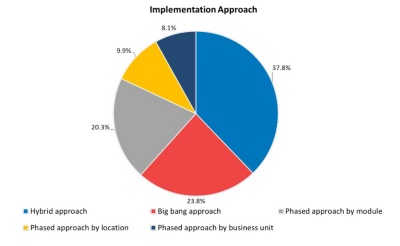
Finally, craft a rollout strategy. Phased deployment reduces risk, while a big‑bang launch accelerates benefits—choose based on company culture and tolerance for change.